RK3588/RK3576 New Carrier Board BSP Bring-Up Checklist: From Power-On to a Running System
Bringing up a new RK3588/RK3576 carrier board follows an ordered path: measure the power rails before first power-on, boot in stages from U-Boot through kernel to device tree, enable peripherals by dependency (storage, Ethernet, USB, display, camera, then application-specific), and finish with stability testing. Changing one variable at a time is the principle that runs through everything.
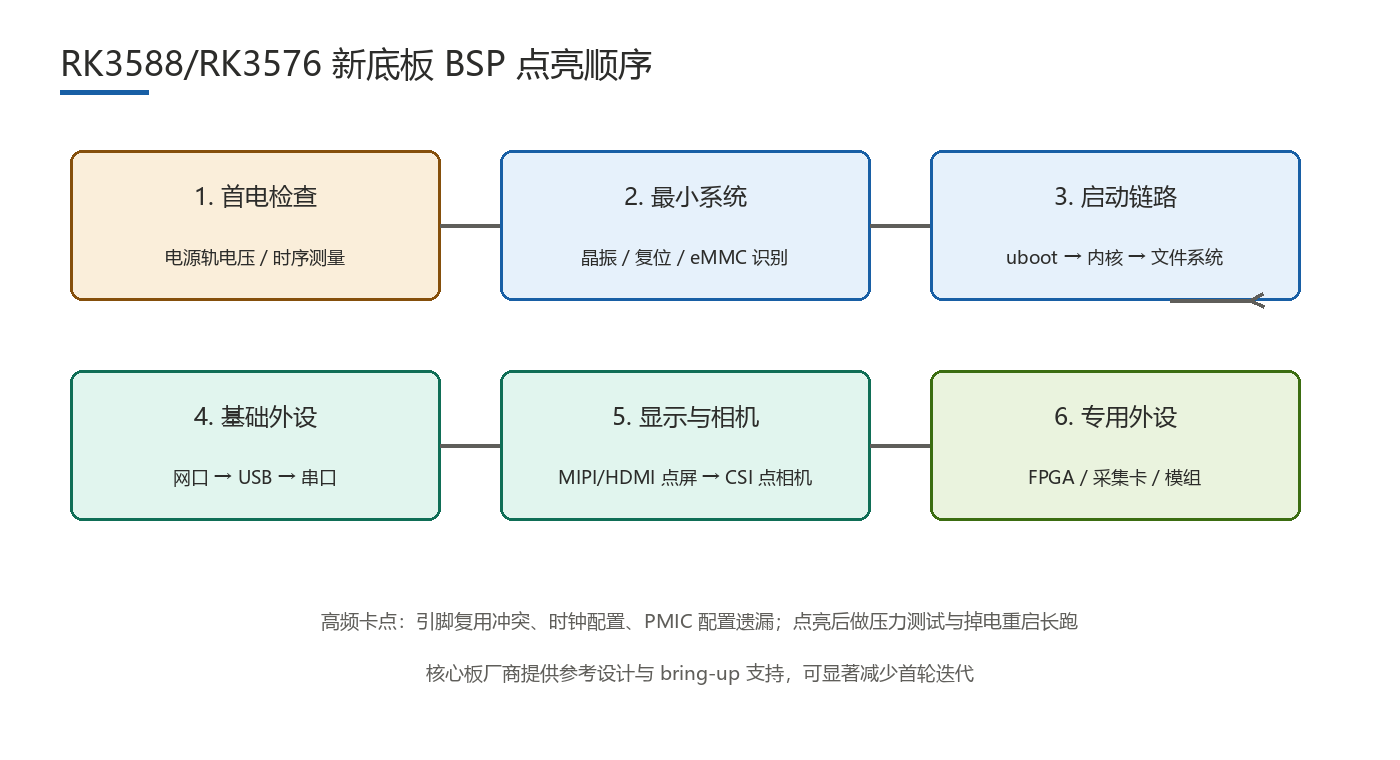
First power-on is the highest-risk moment of the whole project: power design errors, solder shorts, and clock problems all surface here. A systematic flow de-risks it, scoping any failure to the last completed step instead of leaving you facing an undifferentiated mess.
What Should You Check Before First Power-On?
With the SoM unplugged, power the board from a bench supply and measure every rail's voltage level and sequencing against the SoM requirements; verify clock and reset waveforms; only then insert the SoM and watch the minimal system — PMIC, crystal, and eMMC. Tooling baseline: multimeter and oscilloscope, plus a USB-TTL serial adapter ready before you start, since the console is your eyes throughout. Read the reference schematic, pinout table, and PMIC documentation beforehand, and keep a bring-up log — each peripheral's status, changes, and verdicts — which becomes the team's memory across sessions and board revisions.
In What Order Do U-Boot, Kernel, and Device Tree Come Up?
- U-Boot: serial output is milestone one. DDR training is covered by the SoM, so carrier issues usually show up as no console output or timing anomalies. Get U-Boot stable into a loader shell first.
- Kernel: boot with the SoM's default (or minimally modified) device tree to reach a console. Do not configure all peripherals at once.
- Device tree: enable peripherals one at a time, validating each with dmesg and node status before moving on.
What Sequence Should Peripherals Follow?
The order follows dependencies: Ethernet is your debugging lifeline and should come early; display and camera take the longest and belong after the infrastructure is stable.
- Storage (eMMC): boot and read/write — the prerequisite for everything else.
- Ethernet: enables remote logging and tftp kernel loading, multiplying debug efficiency.
- USB: verify host and OTG separately; also your ADB channel.
- Display: bring up one primary output first, then extend to multi-display and touch.
- Camera: MIPI configuration plus sensor drivers is the largest workload — schedule it separately.
- Application-specific: CAN, RS485, SPI devices, ordered by business priority.
What Are the Most Common Bring-Up Blockers?
| Blocker | Typical symptom | Debug approach |
|---|---|---|
| Clock misconfiguration | Peripheral silently does nothing, no errors | Scope the clock to confirm it actually exists |
| Pinmux conflicts | Erratic behavior, functions interfering | Cross-check pinctrl against the pinout table |
| PMIC enable missed | Peripheral has no power at all | Measure every rail and enable pin before bring-up |
| I2C issues | Devices not detected, read/write failures | Scan with i2cdetect; check pull-ups and address conflicts |
Beyond technical blockers, watch the process traps: unrecorded board revisions that force re-debugging, display and camera brought up in parallel and interfering, and SDK documentation skipped in favor of guesswork. These often cost more schedule than the technical problems.
How Do You Validate Stability After Bring-Up?
Between "it boots" and "it ships" lies a full validation phase: stress the CPU/NPU while watching throttling and temperatures; run power-cut reboot cycles to test filesystem and power-sequencing robustness; burn in for 72+ hours to catch memory leaks and crashes; thermal testing per your product spec. Script the test suite and log temperatures and voltages into reports. Also involve the SoM vendor early — schematic reviews and reference designs shorten debugging dramatically and are one of the highest-leverage steps available.
FAQ
- Q1: What do you measure first on a new carrier board?Without the SoM installed, power from a bench supply and measure every rail's voltage and sequencing against SoM requirements, then clock and reset waveforms — only then insert the SoM.
- Q2: Serial console shows nothing — where do you look?Check rails and reset, crystal oscillation, then UART pinmux and level matching; DDR training is the SoM's job, so carrier problems usually live in power and timing.
- Q3: Why enable peripherals in that order?Dependencies: storage boots the system, Ethernet is the remote-debug lifeline, and the camera is the biggest workload, scheduled once infrastructure is stable.
Carrier board bring-up rewards order over cleverness: measure power first, validate boot in stages, sequence peripherals by dependency, and close with stability testing. A written log plus SoM vendor support will compress the schedule more than any single technical trick.
Further reading: RK3588 SoM Customization: MOQ, Pilot Runs and Production Ramp Guide (2026), SoM / Mainboard Customization: Realistic Costs and Timelines, RK3588 Firmware Customization: Complete BSP to Production Firmware Process (2026).
Shenzhen Hongyin Technology Co., Ltd. (HONGYIN TECH) provides embedded project customization on RK3588/RK3576/RK3568 platforms — free requirement review, engineer-direct communication and low-volume ordering. Send your requirement list and receive selection advice and quotes within 48 hours.
phone +86 13728726926 | email sales@hoyin-tech.com | website www.hoyin-tech.com | address: Room 301, Building A, Fanrong Science Park, Sanwei Community, Hangcheng Street, Bao'an District, Shenzhen, China.
Hongyin Tech provides full-stack SoM/SBC customization on Rockchip & HiSilicon platforms with Android/Linux. Engineers respond within 1 business day.
Get a Free Quote →