RK3588 Long-Run Stability: Designing for 24/7 Operation
24/7 stability for RK3588 devices is layered: hardware keeps power and thermal headroom, the system relies on watchdogs and a read-only root, the application adds process recovery and state persistence, and operations keeps remote logs and a rollback path. Judge it by measured 72-hour and 168-hour burn-in metrics.
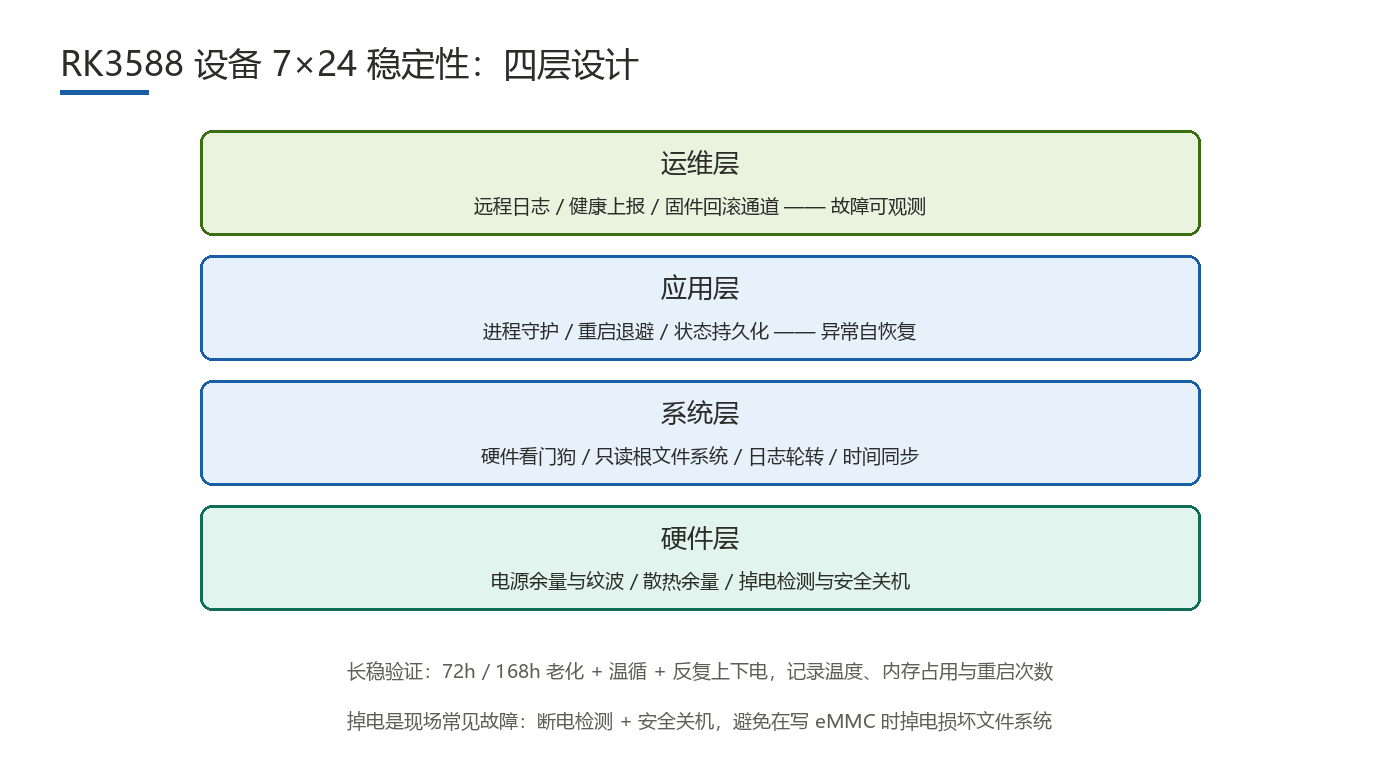
Which Layer Causes Long-Run Instability?
Running fine briefly does not mean running for years. Failures that surface only over time come from four layers:
- Hardware: thin power headroom that collapses under heat, thermal margins that cause throttling, flaky connectors, and fan wear.
- System: memory and handle leaks, logs filling storage, a corrupted root file system, and time-sync drift.
- Application: a process that dies and is never restarted, restart storms, and lost state.
- Operations: no remote logs or health reporting, and no firmware rollback path.
Layering enables location: decide which layer a failure belongs to, then narrow within it. Power and thermal issues cause many long-run failures, yet are often misread as software crashes.
How Do You Design Hardware for Stability?
- Power headroom: leave margin over peak load (a common rule: at least 30%) and watch ripple; voltage sag is a frequent cause of resets.
- Thermal headroom: assess junction temperature at the enclosure's measured high ambient (say 50-60°C), not on a bench.
- Connectors and cables: vibration and thermal cycling accelerate poor contact; secure critical connections.
- Moving parts: fans wear out; check bearing type and rated life and add tach monitoring and stall alerts.
Headroom figures must be confirmed by measurement; RK3588 power and thermal constraints follow the vendor's official datasheet. Validate thermal design at the worst case, not a bare board.
What System-Layer Measures Matter?
- Watchdog and supervision: a hardware watchdog resets a hung system, but the kick logic must reflect real health — never kick blindly.
- Long-run leak checks: leaks are invisible in short tests; record memory, handle, and thread counts over long runs.
- Read-only root and logs: a read-only root prevents corruption that blocks boot; put logs and temp data on a writable partition.
- Time sync and jumps: after power loss the clock jumps back, breaking time-dependent logic; delay sensitive tasks until sync completes.
- RTC and coin cell: offline timekeeping needs an RTC and coin cell, with battery life in the maintenance plan.
A read-only root with a separate data partition is the foundation: it drives system corruption very low and clarifies the boundary between upgrades and data.
How Should Applications Self-Recover?
- Process self-recovery: supervise critical processes and restart them on abnormal exit, logging the exit code.
- Restart-storm suppression: add backoff and a retry cap, then enter a safe mode when the cap is exceeded.
- Fault reporting: report crashes, watchdog resets, and resource overruns to the platform with context.
- State persistence: periodically flush key state so a restart returns to a consistent point.
The principle is "allow failure, recover fast, keep evidence": do not chase a process that never crashes, but ensure automatic recovery and retained data.
Reliable Brownout Protection
Power loss is common, and a brownout during an eMMC write can corrupt the file system. Handle it in three steps:
- Detection and safe shutdown: on a voltage sag, trigger a safe shutdown that finishes in-flight writes and flushes caches.
- Supercapacitor versus UPS: supercapacitors are cheap and long-lived but store little energy — enough for a brief shutdown; a UPS stores more but adds size and cost.
- Avoid brownouts during writes: make critical writes atomic (temp file, then rename) and shorten the write window.
Prove protection by test: cut power repeatedly during writes and check that the file system survives and the device recovers. Part times follow measurement.
Testing Stability and Locating Faults
Pass criteria need a defined duration and workload:
| Layer | Key measures | Verification method |
|---|---|---|
| Hardware | Power/thermal headroom, connectors, fan life | Full-load runs at high ambient; monitor temperature and throttling |
| System | Watchdog, leak control, read-only root, time sync | 168-hour run; record memory and handle curves |
| Application | Process recovery, backoff, state persistence | Inject crashes; verify recovery time and state consistency |
| Whole unit | Brownout protection and repeated power cycles | Power-cycle stress; check file system and boot success |
A common combination is 72 hours of functional burn-in plus 168 hours of long-run testing, with thermal cycling, power cycles, and sustained load. Pass criteria: no abnormal reboots or watchdog resets, no monotonic rise in memory or handles, full availability of key functions, and automatic recovery after power loss. Recording "it did not crash" is not enough — a test without curves cannot reveal trends.
Locate faults by layer first, then narrow: decide whether the issue is power, thermal, storage, or software; use logs and measured data to narrow further (temperature and frequency curves separate thermal from software stalls). This prevents "change the code first": many apparent crashes trace back to power or thermal root causes.
FAQ
- Q1: Does a 24/7 device need 168-hour burn-in?Run a 168-hour long-run test plus 72 hours of functional burn-in; short tests miss slow leaks. Record quantitative curves.
- Q2: Can a watchdog replace process self-recovery?No. The watchdog resets a hung system; process faults belong to a supervisor that logs.
- Q3: Supercapacitor or UPS for brownout protection?Size by the safe-shutdown time needed: short hold-up favors a supercapacitor; longer runtime favors a UPS.
- Q4: Why does a device slow down after long runs?Check thermal throttling first, then memory pressure from leaks. Cross-reading temperature, frequency, and memory curves beats guessing.
Hongyin Tech provides full-stack SoM/SBC customization on Rockchip & HiSilicon platforms with Android/Linux. Engineers respond within 1 business day.
Get a Free Quote →