RK3588 vs RK3588S vs RK3588S2: Differences and Selection Guide
RK3588, RK3588S, and RK3588S2 come from the same platform generation with essentially identical CPU and NPU architectures; the real differences are interface count, package size, and thermal and power constraints. Select by product form and interface requirements, not by model age, and confirm every detail against the official datasheet.
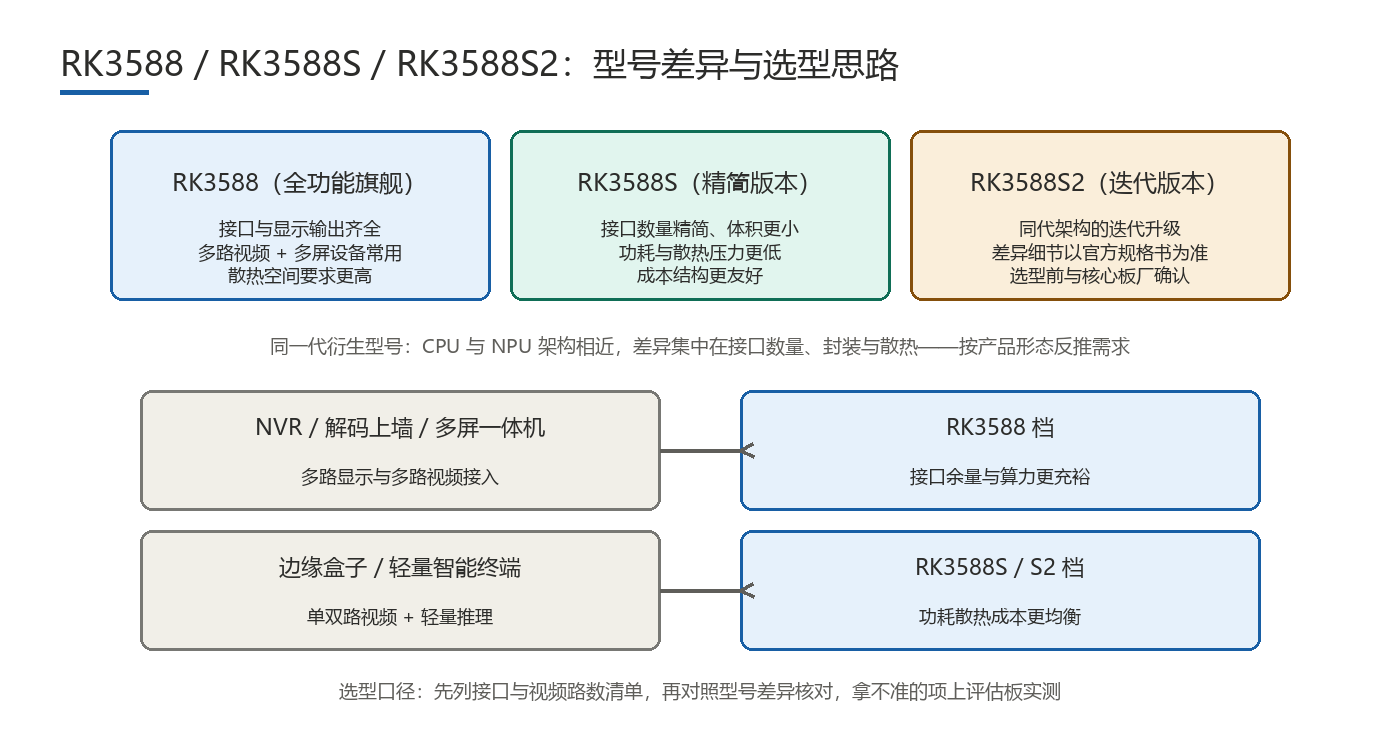
Where Do RK3588, RK3588S, and RK3588S2 Actually Differ?
All three come from one core. Public information shows the same 4×A76+4×A55 CPU architecture and comparable NPU throughput, so raw benchmark gaps are minor. The real differences sit at the periphery: derivative models in a generation typically trim some high-speed interfaces, reduce display and MIPI lanes, and adopt packages with fewer pins to fit smaller boards and tighter thermal budgets. In short, vendors do interface add-and-subtract on one core rather than tier the performance. Treat the three as "same compute tier, different interface configuration." Exact interfaces, lane counts, and pin counts must come from the official datasheet; online comparison tables vary and often conflict, so verify item by item with your SoM vendor before committing.
How Much Do PCIe, Display, and MIPI Inputs Differ?
These three dimensions are where selection mistakes happen often, so check against peak product requirements rather than current needs. The table below is directional; specific numbers belong in the datasheet.
| Dimension | RK3588 | RK3588S | RK3588S2 |
|---|---|---|---|
| Interface count and package | Fuller interface set, larger package | Trimmed interfaces, smaller package | Adjusted from S; details per datasheet |
| PCIe lanes | More lanes (count per datasheet) | Fewer lanes | Support and count must be verified |
| Display outputs / MIPI inputs | More outputs and inputs | Fewer outputs and inputs | Verify against datasheet |
| Typical device form | NVR, all-in-one, multi-display, SoM | Thin terminals, tablet-class devices | Depends on configuration |
Verification is straightforward: list your interface requirements — how many PCIe lanes, display outputs, and MIPI inputs; whether you need USB3 or multiple Ethernet ports — then check each against the three datasheets. If a single item falls short, "similar performance" is not a reason to proceed. In practice, display outputs and MIPI inputs are discovered too late most often, so verify against peak requirements from the start.
Which Model Fits Which Device Form?
- NVRs and all-in-one units: need multiple display outputs, drive bays, and camera inputs — typically the fuller-interface RK3588.
- Thin all-in-ones, tablet-class, and low-power terminals: slim interface and display needs with limited thermal room — the smaller, trimmed S series.
- SoMs and custom carrier boards: depends on the interfaces and thermal structure the carrier must support; confirm package and pin capability with the SoM vendor first.
- Multi-display and video-wall decoders: sensitive to display output count; verify display paths before other interfaces.
Device form is only the starting point. What actually decides whether a model fits is the interface list. Different products in the same form can have very different interface needs, so avoid selecting by form template.
What Trade-Offs Come with Thermal and Power Constraints?
Models with smaller packages and trimmed interfaces usually target more compact devices with less room for cooling. Heat output depends on load: heat flux under heavy CPU and NPU use is far higher than at idle, so "can it be cooled" is not decided by the chip model alone but by enclosure structure and airflow. A compact device that runs heavy loads for long periods (multi-stream decode, continuous inference) needs a serious look at heat-sink area, thermal interface material, and the enclosure conduction path — and may need reduced sustained load or a fan. For the budgeting method, see the companion thermal-design article and estimate per scenario.
How Should You Read Supply and Lifecycle?
Keeping several models in one generation is meant to cover differently positioned devices, and their supply cadence and lifecycle policies are not identical. For long-lifecycle industrial equipment, confirm current supply and also understand the vendor's model roadmap and substitution relationships, then assess how much "same package, same pinout" interchange room exists. This article offers method only: put model roadmap, package compatibility, and buffer-stock windows into the project review; confirm actual supply with the vendor channel and your SoM partner, and make no discontinuation forecasts here.
Common Pitfall: Can You Swap Models Just Because CPU/NPU Match?
No. A common misjudgment is assuming the three are interchangeable because CPU architecture and NPU throughput match. What actually decides interchangeability is the peripheral interface and package: display outputs, MIPI inputs, PCIe, USB, Ethernet counts, plus package pinout, thermal structure, and power design. Any mismatch forces a carrier-board redesign. Invert the logic — list interface needs first, then pick the model — and you avoid the "choose the chip, then patch the interfaces" rework.
FAQ
- Q1: How much do the three models differ in performance?Their CPU and NPU architectures are essentially identical with a comparable compute tier; differences lie in interface count and package, not performance grading. Confirm specifics against the official datasheet.
- Q2: Can matching CPU/NPU make them drop-in replacements?No. Interchange depends on display outputs, MIPI inputs, PCIe, USB, Ethernet counts, and package pinout; any shortfall forces a new carrier design.
- Q3: Where do you verify interface counts?From the official datasheet, confirmed with your SoM vendor on package, pinout, and carrier expansion. Online tables vary and should not be used directly.
- Q4: In what order should you select?Write the product form and interface list first, match each item against model specs, then factor in thermal and supply constraints — not model age.
Hongyin Tech provides full-stack SoM/SBC customization on Rockchip & HiSilicon platforms with Android/Linux. Engineers respond within 1 business day.
Get a Free Quote →