How to Upgrade RK3588 Firmware: OTA, A/B Partitions, and Delta Updates
Choose firmware upgrade methods for RK3588 devices by deployment scenario: local SD/USB flashing for the factory and RMA, manually triggered network upgrades for small field batches, and a full OTA platform at scale. Underneath sits A/B dual-bank partitioning with atomic switching and integrity checks, so upgrades survive power loss and operator mistakes.
Which Upgrade Method Fits Which Scenario?
Match the method to the situation: device count, downtime tolerance, and cost of failure.
| Scenario | Recommended method | Main cost | Key risk |
|---|---|---|---|
| Production and RMA | Local SD/USB flashing or production tools | Manual, on-site labor | Accidental overwrite; mixed versions |
| Small field batches | Manually triggered network update | One-by-one confirmation, slow | Inconsistent version baseline |
| Large-scale online | OTA platform with staged rollout | Server and monitoring effort | Amplified failure scope; bandwidth load |
| Urgent single-defect fix | Targeted delta update | Complex generation and verification | Baseline mismatch fails verification |
Production tools suit chip-level flashing; SD/USB media suit offline or repair work; manual triggering fits pilot units; OTA suits scale. Once a fleet passes a few hundred units or spans multiple sites, move to an OTA platform — manual upgrading escalates in time and travel cost. RK3588 boot modes and partition tables follow the vendor's official datasheet; flashing tools and image formats are not interchangeable.
Full-Image or Delta Updates: Which to Choose?
Two package forms differ in size, speed, and chain complexity.
- Full-image: the complete image is delivered — simple and baseline-agnostic, but large, slow, and bandwidth-hungry.
- Delta: only the difference is sent, commonly one to two tenths of the full image — fast and light, but it demands a strict baseline: the delta must match the device version exactly, and generation and verification grow far more complex.
Quantify it: a 1-2 GB image across thousands of units means heavy traffic and time, where deltas pay off; tens of units on good links favor full images. A delta scheme must also track baselines, rollback compatibility (chains may be missing for cross-version jumps), and verification (re-check integrity and signature after reconstruction). The usual pattern is full image as baseline, delta for the routine.
How Does A/B Dual-Bank Partitioning Work?
A/B splits storage into two bootable slots; an upgrade writes the inactive slot and switches on reboot, so a working system always exists. Four points matter:
- Layout: bootloader, boot, system/rootfs, and vendor partitions exist in pairs, with a shared user-data partition.
- Space cost: duplicating system partitions nearly doubles storage use; budget for it and reserve cache space.
- Switch and rollback: the first boot enters a trial state; without confirmation within a boot-count or time window, the bootloader rolls back.
- Bootloader flags: slot flags, trial counters, and confirmation state must live where the upgrade cannot overwrite them.
A common trap is dual-bank partitioning without rollback logic: the new system boots but misbehaves and the device stays wrong. Use two conditions — a system-health flag plus a business self-test.
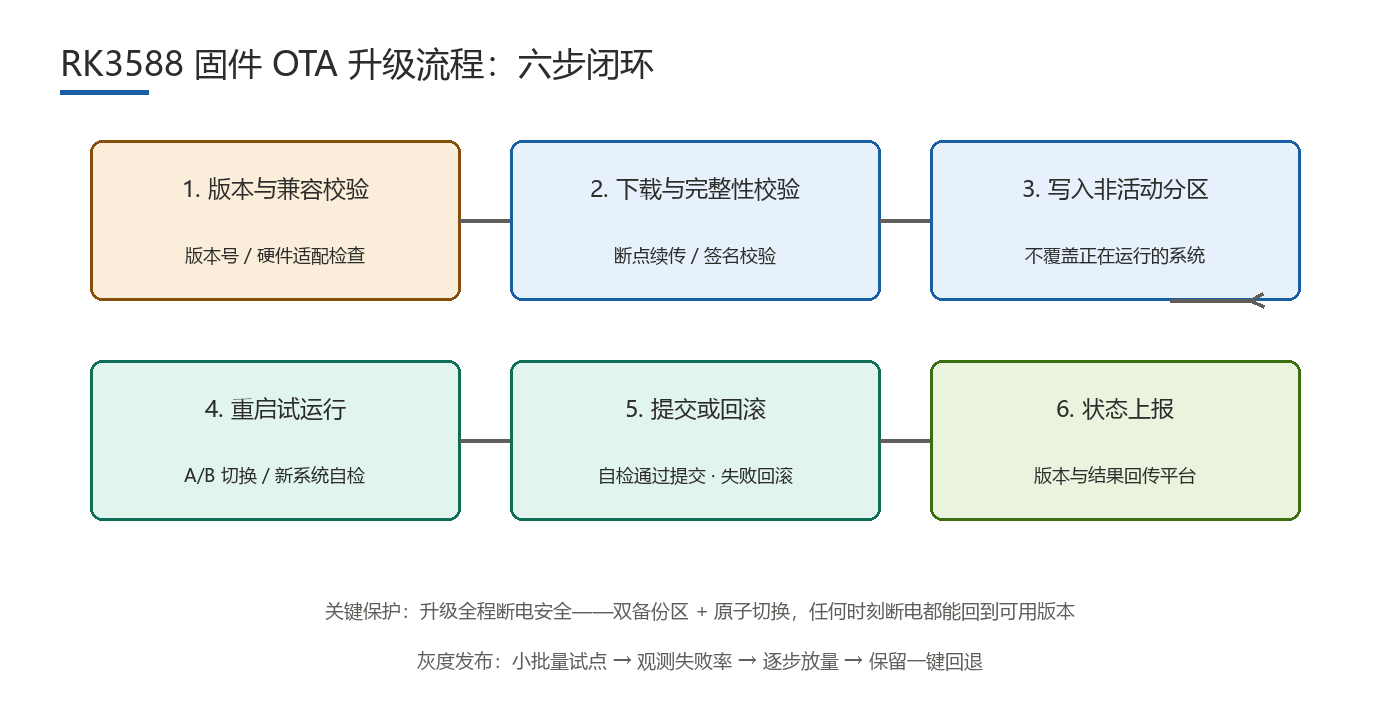
The Six-Step Update Flow
Each step defines a failure action:
- Version check: confirm the path is legal; abort and report on failure.
- Download: chunked transfer with resume and rate limiting; retry with backoff.
- Integrity check: verify hash and signature; delete and re-download on failure, never write.
- Write the inactive slot: erase, write, read back; clean the slot on failure.
- Reboot into trial: flip the boot flag; boot failure is caught by bootloader rollback.
- Commit or roll back: commit after a passing self-test, otherwise roll back and report.
Never write in place to the active partition — one power loss then makes the device unbootable. Signature mechanics belong to the security domain.
If Power Drops Mid-Upgrade
The common field failure is power loss during the upgrade, handled by three layers:
- Dual banks: A/B guarantees one complete, bootable system at all times.
- Atomic switch: the switch is a single indivisible flag write, so either the old or new version takes effect.
- No in-place writes: upgrades touch only the inactive slot, and config lives in separate, backed-up storage.
Add timeouts and retry counters and record when power failed; brownout-capable devices can pause and flush on a sag. Confirm protection by measurement — cut power during writes and count how reliably the device recovers.
How Do You Stage a Rollout and Avoid Pitfalls?
Upgrade in stages: a small pilot covering different hardware revisions, watch failure rate and key metrics (boot success, availability, reboots), then expand at 5-10%, 30%, and full fleet with one-touch rollback throughout. Pause if the pilot exceeds the threshold.
Pitfalls cluster around config overwritten after upgrade, accidental SD/USB flashing, version numbers not incremented (breaking rollback decisions), and mixed-version fleets jumping across versions (broken delta chains). Android ships official A/B and read-only system partitions; Linux distributions rely on custom schemes, leaving rollback and verification to the team.
FAQ
- Q1: Is A/B partitioning mandatory?No, but strongly advised for online devices you cannot service on site; a single bank that loses power may fail to boot.
- Q2: How should delta and full-image packages combine?Deltas for routine upgrades, full images as backstop for cross-version jumps or missing chains; re-verify after reconstruction.
- Q3: Will a brownout brick the device?With no in-place writes, atomic switching, and trial confirmation, power loss usually only interrupts the upgrade.
- Q4: How large should a rollout be?Start with the smallest batch covering all revisions, observe one cycle, then expand from 5-10% onward.
Hongyin Tech provides full-stack SoM/SBC customization on Rockchip & HiSilicon platforms with Android/Linux. Engineers respond within 1 business day.
Get a Free Quote →